01
Give it the conversation
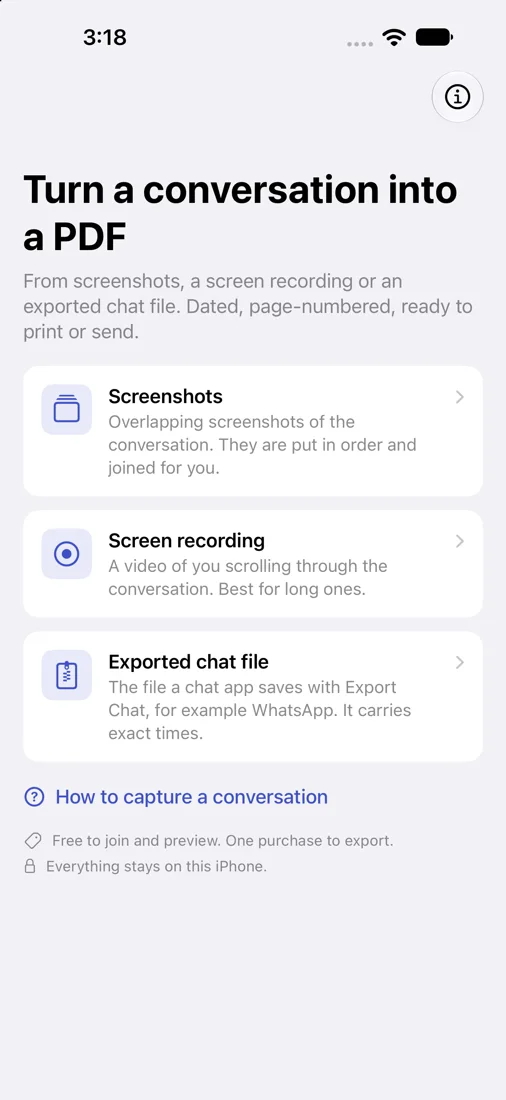
Choose overlapping screenshots, a screen recording of you scrolling, or the file a chat app saves with Export Chat.
Print Text Messages to PDF for iPhone
Print Text Messages to PDF turns screenshots, a screen recording or an exported chat file into a dated, page-numbered PDF and a transcript, on your iPhone. See your own conversation joined and read for free, then export it with one purchase.
Free to join and preview. One-time purchase to export. No subscription.
Unlimited Exports is a one-time purchase. Requires an iPhone with iOS 17 or later.
How it works
01
Choose overlapping screenshots, a screen recording of you scrolling, or the file a chat app saves with Export Chat.
02
The app puts the screenshots in order, joins them into one continuous conversation and reads the messages with the iPhone’s own text recognition.
03
See the whole conversation and its transcript for free. Correct a name, a date or any line before you export.
04
Choose a format, then print, save to Files, AirDrop or email from the share sheet.
What you get
The conversation as it looked, cut into pages between messages, with page numbers, the export date and an optional cover page. The text in it can be searched.
Transcript
Who said what, under the time shown on screen, as typeset text.
Spreadsheet
One row per message. Opens in Numbers and Excel.
Text
A text file you can paste anywhere.
Honest about what it is
iPhone apps are not allowed to read your messages. The app works from your screenshots, your screen recording or your exported chat file, and from nothing else.
Where two screenshots do not overlap, the app tells you and marks the place in the PDF. Messages may be missing there.
Text is read by the iPhone’s on-device text recognition. On made-up test conversations in 11 languages it found 1,034 of 1,035 messages, with about 0.1% of characters wrong (about 1% in Chinese). The picture pages are always the reference. Emoji stay in the pictures but are not in the transcript.
Messages shows a time only above each group of messages. Each message is listed under the time shown before it. An exported chat file carries the exact time of every message.
Screenshots must come from the same iPhone and be upright. Leave out cropped ones.
An export is a faithful copy of what the screen showed, with the date it was made. It is not a certified document. Ask the court or office you send it to what they accept.
Start here
Our guides cover the free ways first: printing screenshots from Photos, and printing a conversation from Messages on a Mac. They say where each falls short, then show how the app does the same job.
How to print text messages from an iPhoneMore guides:
Your conversations stay yours
Joining, text recognition and the PDF are all made on your iPhone. Your screenshots, recordings and chat files are never uploaded. The app contacts the App Store only for the purchase. Version 1.0 has no advertising, analytics or tracking.
Print Text Messages to PDF is independently developed by Arctic Studios LLC and is not affiliated with, sponsored by, or endorsed by Apple Inc.
Read the app privacy policyHelp
No. Unlimited Exports is a single purchase that unlocks every export of every conversation: both PDFs, the spreadsheet and plain text. After reinstalling or changing iPhones, use the same Apple Account and choose Restore purchase in the app.
No. iPhone apps are not allowed to read your messages, so you give the app the conversation as screenshots, a screen recording or an exported chat file.
If an import, a purchase or an export does not behave as expected, the support page covers capturing, corrections, purchases and refunds, and has the studio’s email address.
Texts to PDF supportSee your own conversation joined and read before deciding to buy.