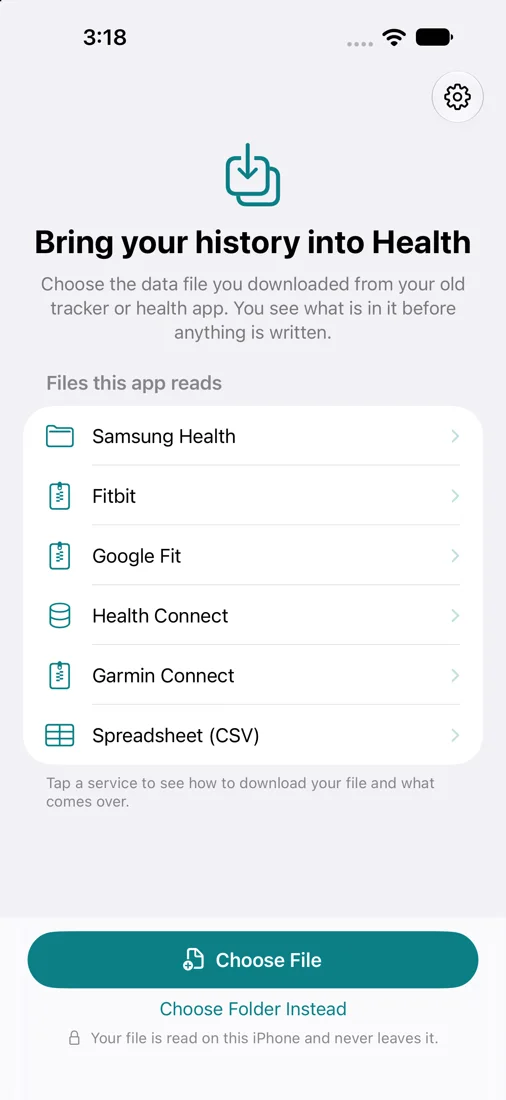
You moved to an iPhone or an Apple Watch. Your steps, sleep, weight, heart rate and workouts from the last few years stayed in another app. Health History Import reads the data file that app lets you download and writes its history into Apple Health, on your iPhone.
Free scan and preview. One-time purchase to import. No subscription, no account.
How it works
- Download your data file. Every service the app reads lets you download your own data. The app shows the steps for each one.
- Choose the file. A ZIP or a folder from Files. The app scans it on your iPhone.
- See the preview. How many records of each type, from which dates, and what Health already holds for the same days. This part is free.
- Import. One purchase writes everything to Health, from this file and any later one.
Files it reads
| Service | The file | What comes over |
|---|---|---|
| Samsung Health | "Download personal data" folder or a ZIP of it | Steps, distance, floors, active energy, workouts, sleep with stages, heart rate, blood oxygen, respiratory rate, blood glucose, weight, body fat, height, water |
| Fitbit | Google Takeout download, or the older MyFitbitData.zip | Steps, distance, floors, workouts, sleep with stages, heart rate, resting heart rate, weight, body fat, BMI, height, water |
| Google Fit | Google Takeout download | Steps, walking and cycling distance, workouts, sleep, heart rate, blood pressure, weight, height |
| Health Connect | Health Connect.zip backup | Steps, distance, floors, active energy, workouts, sleep with stages, heart rate, resting heart rate, blood oxygen, respiratory rate, VO2 max, blood pressure, blood glucose, body temperature, weight, body fat, lean mass, height, water |
| Garmin Connect | "Export Your Data" ZIP | Daily steps, distance, energy and floors, resting heart rate, workouts, sleep, water |
| Any spreadsheet | A CSV file with a header row | Whatever columns you map: weight, blood pressure, glucose, steps and more |
Why people choose it
- The whole history, once. No account to link, no sync that breaks when a service changes its sign-in, no limit on how far back it goes.
- Repeat-import checks. The app checks which records it previously wrote. Review overlapping dates if you have files from multiple services.
- You can undo it. One control deletes everything the app wrote. Data from other apps and devices is never touched.
- Private. Your file is read on your iPhone. The app has no server and no analytics.
What it does not do
- It does not keep syncing. It is for moving history, once or whenever you download a newer file.
- It does not import workout routes (GPS), nutrition logs, stress scores or heart rate variability.
- Garmin's download holds daily totals and no sleep stages, so that is what comes over.
- It does not read an export made by Apple Health itself. For that, see Health Data Restore.
Guides
- Samsung Health to Apple Health
- Fitbit history to Apple Health without linking an account
- Health data from Android to iPhone
- Garmin Connect to Apple Health
Health History Import is made by Arctic Studios and is not affiliated with Samsung, Google, Fitbit or Garmin. Their product names are trademarks of their owners.